-
cPicture 3.5.3
cPicture is updated to version 3.5.3
-
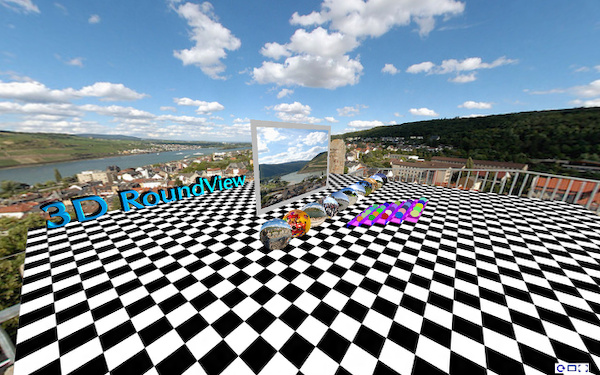
added function to create panorama websites using 3D-RoundView
-
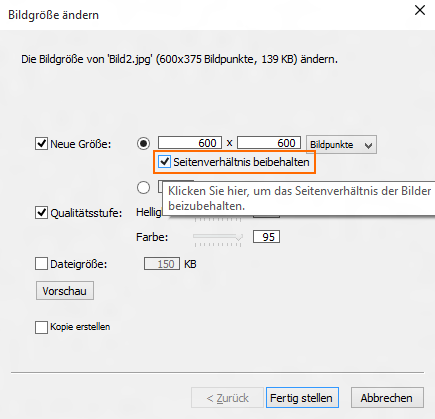
added option to resize with or without fixed aspect ratio
cPicture is a portable App with no installation required.
Download the .ZIP file, (click here for the 64bit version) open the ZIP file and copy the cPicture.exe anywhere on your computer to run the app or use the 'Check for updates' button in the 'Other' category.
For convenience use the Microsoft Installer to create a program folder and copy the app:
Download German 32bit Installer MSI Download English 32bit Installer MSI
Download German 64bit Installer MSI Download English 64bit Installer MSISee the Download Instructions for more details.
For questions, please mail to: cpicture
-
-
cPicture 3.5
cPicture is updated to version 3.5.
A new selection is added for most of the commands to choose the actual selection. It makes using the app so much easier!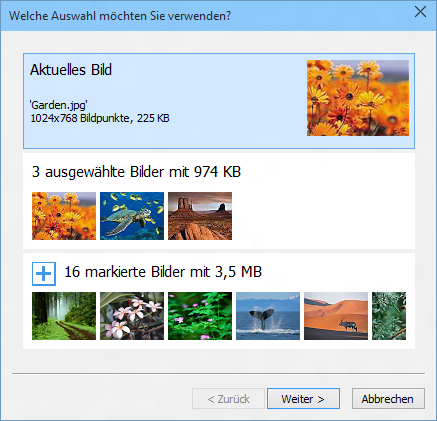
cPicture is a portable App with no installation required.
Download the .ZIP file, (click here for the 64bit version) open the ZIP file and copy the cPicture.exe anywhere on your computer to run the app or use the 'Check for updates' button in the 'Other' category.
For convenience use the Microsoft Installer to create a program folder and copy the app:
Download German 32bit Installer MSI Download English 32bit Installer MSI
Download German 64bit Installer MSI Download English 64bit Installer MSISee the Download Instructions for more details.
For questions, please mail to: cpicture
-
cPicture 3.4.4
cPicture is updated to version 3.4.4
- added support for Scanner using WIA (Windows Image Acquisition)
- fix problem for size and order of detailled view columns
- minor updates
32bit version contains Scanner access via TWAIN or WIA

64bit version contains Scanner access via WIA

cPicture is a portable App, so no installation is required.
Download the .ZIP file, (click here for the 64bit version) open the ZIP file and copy the cPicture.exe anywhere on your computer to run the app or use the 'Check for updates' button in the 'Other' category.
See the Download Instructions for more details.For questions, please mail to: cpicture
-
cPicture 3.4.3
cPicture is updated to version 3.4.3
- improved performance for network drives (NAS)
As Network attached drives (NAS) are slower compared to the build-in computer drives, the access to the media folders require more time. This update automatically detects slower network drives and uses a fast network drive access.
Note: All folders for the fast network drive access will have a (+) symbol assigned.
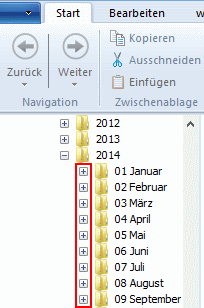
The setting to exclude additional data and check if folders contain sub folders is set by default to on and can be changed in the settings.
cPicture is a portable App, so no installation is required.
Download the .ZIP file, (click here for the 64bit version) open the ZIP file and copy the cPicture.exe anywhere on your computer to run the app or use the 'Check for updates' button in the 'Other' category.
See the Download Instructions for more details.For questions, please mail to: cpicture
-
cPicture 3.4.2
cPicture is updated to version 3.4.2
- include the new LCMS 2.6 color profile engine.
- improved change detection for folder content
cPicture is a portable App, so no installation is required.
Download the .ZIP file, (click here for the 64bit version) open the ZIP file and copy the cPicture.exe anywhere on your computer to run the app or use the 'Check for updates' button in the 'Other' category.
See the Download Instructions for more details.For questions, please mail to: cpicture