-
cPicture 3.7
cPicture is updated to version 3.7
- updated to support devices with high pixel density (High-DPI)
cPicture is a portable App with no installation required.
Download the .ZIP file, (click here for the 64bit version) open the ZIP file and copy the cPicture.exe anywhere on your computer to run the app or use the 'Check for updates' button in the 'Other' category.
For convenience use the Microsoft Installer to create a program folder and copy the app:
Download German 32bit Installer MSI Download English 32bit Installer MSI
Download German 64bit Installer MSI Download English 64bit Installer MSISee the Download Instructions for more details.
For questions, please mail to: cpicture
-
cPicture 3.6.3
cPicture is updated to version 3.6.3
- update color management engine to v2.8
- added sorting by file extension
cPicture is a portable App with no installation required.
Download the .ZIP file, (click here for the 64bit version) open the ZIP file and copy the cPicture.exe anywhere on your computer to run the app or use the 'Check for updates' button in the 'Other' category.
For convenience use the Microsoft Installer to create a program folder and copy the app:
Download German 32bit Installer MSI Download English 32bit Installer MSI
Download German 64bit Installer MSI Download English 64bit Installer MSISee the Download Instructions for more details.
For questions, please mail to: cpicture
-
cPicture 3.6.2
cPicture is updated to version 3.6.2
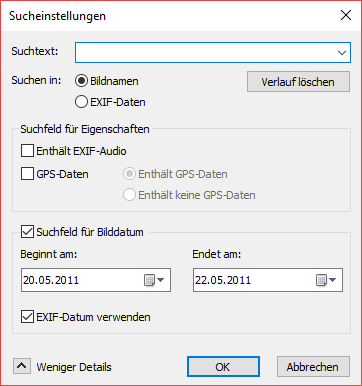
- updated search (F3 search dialog) to fix a problem with the exif date search
cPicture is a portable App with no installation required.
Download the .ZIP file, (click here for the 64bit version) open the ZIP file and copy the cPicture.exe anywhere on your computer to run the app or use the 'Check for updates' button in the 'Other' category.
For convenience use the Microsoft Installer to create a program folder and copy the app:
Download German 32bit Installer MSI Download English 32bit Installer MSI
Download German 64bit Installer MSI Download English 64bit Installer MSISee the Download Instructions for more details.
For questions, please mail to: cpicture
- updated search (F3 search dialog) to fix a problem with the exif date search
-
cPicture 3.6.1
cPicture is updated to version 3.6.1
- Add unicode EXIF comments using the ExifTools
cPicture is a portable App with no installation required.
Download the .ZIP file, (click here for the 64bit version) open the ZIP file and copy the cPicture.exe anywhere on your computer to run the app or use the 'Check for updates' button in the 'Other' category.
For convenience use the Microsoft Installer to create a program folder and copy the app:
(security dialog: allow installer to execute)
Download German 32bit Installer MSI Download English 32bit Installer MSI
Download German 64bit Installer MSI Download English 64bit Installer MSISee the Download Instructions for more details.
For questions, please mail to: cpicture
-
cPicture 3.6
cPicture is updated to version 3.6
- updated to JPEG 9b
- fast navigation view
- includes lots of improvements submitted from the website feedback
cPicture is a portable App with no installation required.
Download the .ZIP file, (click here for the 64bit version) open the ZIP file and copy the cPicture.exe anywhere on your computer to run the app or use the 'Check for updates' button in the 'Other' category.
For convenience use the Microsoft Installer to create a program folder and copy the app:
(security dialog: allow installer to execute)
Download German 32bit Installer MSI Download English 32bit Installer MSI
Download German 64bit Installer MSI Download English 64bit Installer MSISee the Download Instructions for more details.
For questions, please mail to: cpicture